

Back to Apps
    iCheckBalance icon

    iCheckBalance

    iCheckBalance is an easy to use checkbook app and a bill tracking app in one. 
+ iCheckBalance has a simple spreadsheet like interface that makes reconciling s...

    finance
    4
    25+
    iOS
    $1.99
    Honest Take

    + Users praise the app's intuitive interface, spreadsheet-like reconciliation, and drag-and-drop functionality for transactions.

    Users request the ability to edit bill names, share data between devices/users, and import data from external sources.

    This page contains affiliate links. Learn more

    Screenshots

    iCheckBalance screenshot 1
    iCheckBalance screenshot 2
    iCheckBalance screenshot 3
    iCheckBalance screenshot 4
    iCheckBalance screenshot 5

    Swipe to view more screenshots

    About iCheckBalance

    iCheckBalance is an easy to use checkbook app and a bill tracking app in one.

    
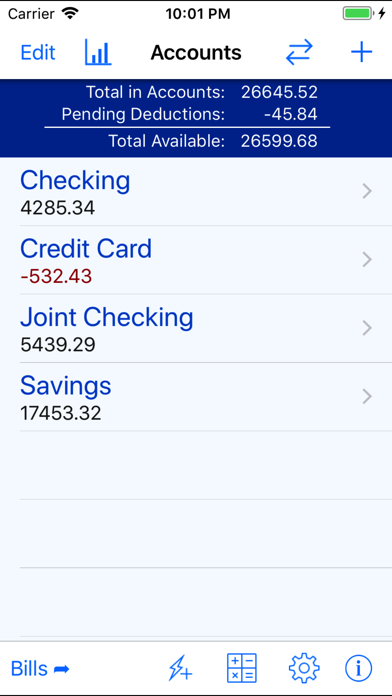
+ iCheckBalance has a simple spreadsheet like interface that makes reconciling statements a snap. 
+ Transaction rows can be moved up or down to change the sequence to match your bank statement.


    • New transaction rows can be inserted at the end, or above, or below an existing row.
    • Balance is calculated for each transaction. 
+ Transactions not yet cleared can be marked as pending and (optionally) removed from the balance calculations. 
+ Reconciled transactions can be flagged as such.
    • Quick fill feature for fast transactions entry.
    • Easily Transfer amounts between accounts.
    • Cash flow charts.
    • Charts deposits, deductions, and balance over day, week, month or year time periods.
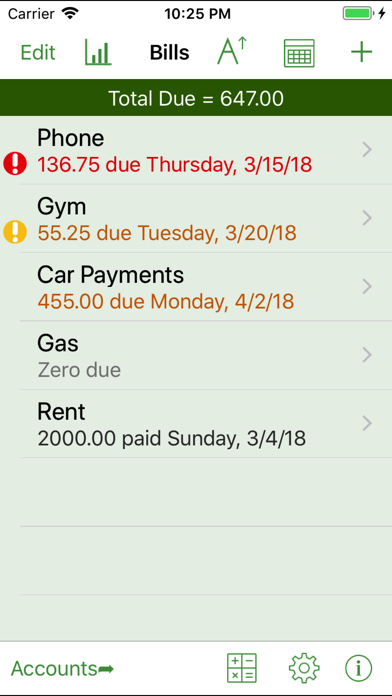
    • Bills and payments can be tracked for multiple bill accounts.
    • Bills can be setup to recur weekly, bi-weekly, monthly, 6-monthy or yearly.
    • Bills can be viewed on calendar.
    • Bills can be sorted by due date.
    • Bills due soon and overdue are marked.
    • Bill payments can be deducted from an account when entering bill payment. 


    • In-app multi-line calculator: great for calculating discounts and percentages.
    • Rows in calculator can be edited with all results updating like a spreadsheet.
    • Passcode lock for added security with option to unlock using Touch ID (or Face ID on iPhone X).
    • Help info in the app; no separate manual needed.
    • You get all the features when you buy the app and get all future updates for free. There are no in-app purchases for additional features or subscriptions to buy and no ads in the app.

    All data backed up on sync. You can also export account data in CSV format for reading into spreadsheets or for keeping your own backup.

    Get iCheckBalance and avoid late fees and bank charges by staying on top of your bank accounts, credit cards and bills.

    Key Features

    Family Friendly
    Lightweight

    Similar Apps

    Hidden Gem
    tMoney Budget icon

    tMoney Budget

    A budget is more than just a list of numbers—it's where you go to find answers. tMoney was designed to take you beyond basic income and expense tracking. It's built to help you gain valuable insight into your financial situation, correct money habits that may be holding you back, and achieve the goals that matter most—whether that’s becoming debt-free, buying a home, or managing your money with confidence. Unlike other budgeting apps, tMoney doesn’t try to act like a bank. There’s no need to link your personal banking data—most banks already provide those tracking tools. Instead, tMoney focuses on helping you build a clear financial strategy that you can adjust and optimize for your unique life. Whether you're preparing for a future expense, weighing a career change, or striving to reach your savings goals, tMoney puts you in control of your financial future. Key Features: • Gain true clarity over your finances: tMoney helps you include all your income sources, then easily toggle them on or off to understand how each impacts your overall financial picture. With this clarity, you’ll make smarter decisions about spending and saving. • Plan for life’s unexpected changes with confidence: Dynamic toggles allow you to switch expense groups on and off, so you can see how different scenarios (like a rent increase or a new job offer) affect your budget. This flexibility gives you peace of mind in any situation. • Keep your budget on track automatically: tMoney calculates direct deposit allocations, ensuring that your income is immediately set aside for your priorities. This proactive approach keeps your financial plan running smoothly, no matter how busy life gets. • Master your food budget with precision: With dedicated tools to manage grocery and dining expenses, you can take full control of your food budget—one of the trickiest areas to manage. Stay on top of your spending and save more without sacrificing the things you enjoy. • Prevent financial surprises by planning

    Empowering
    Strategic
    Insightful
    finance
    5
    Freemium
    Hidden Gem
    SEE Finance 3 Mobile icon

    SEE Finance 3 Mobile

    Manage all of your financial accounts in a single place and gain control over your finances. Track all of the financial accounts you might have including banking, credit cards, investments and others. Packed full of options to allow you to take total control of your finances. There are many options available to you to personalize the app just for you. Store your file(s) on iCloud Drive and access them from your Mac, iPhone and iPad. iCloud Drive lets you access your files from multiple devices, keeps them secure, and under your control. Features: - Quick Transaction Entry - Split Transactions - Transaction Attachments - Multiple Currency Support - Create Multiple Files - Customizable Preferences - Companion macOS Version

    Reliable
    Comprehensive
    Self-sufficient
    finance
    5
    Freemium
    Hidden Gem
    Simple Checkbook. icon

    Simple Checkbook.

    A simple checkbook to help organize your finances. Features: - Keep track of any number of accounts. - For each transaction, track the date, name, type, amount, check number, category, and notes. - Mark transactions as cleared. - Displays cleared, outstanding, and current balance. - Ability to filter transactions displayed. - Display charts for expenses or income by category. - Syncs to iCloud

    Practical
    No-frills
    Organized
    finance
    5
    Freemium
    Hidden Gem
    Simple Offline Budget icon

    Simple Offline Budget

    Simple Offline Budget: Your private, offline budget tracker. Tired of budget apps that require accounts, link to your bank, or bombard you with ads? Simple Offline Budget is designed for those who value privacy and simplicity above all else. 100% Offline No internet connection? No problem. All your financial data is stored directly on your device, giving you total control and lightning-fast performance even without a data connection. Complete Privacy No accounts. No cloud syncing. No tracking. Your finances are nobody's business but your own. Because your data stays on your phone, you never have to worry about data breaches or third-party tracking. Zero Ads, Zero Clutter We believe a budget tool should be focused on your money, not on selling you credit cards. Enjoy a clean, beautiful interface with absolutely no advertisements or intrusive pop-ups. Key Features: Instant Expense Tracking: Log spending in seconds. Budget Management: Set monthly limits for categories like Food, Rent, and Travel. Income Tracking: Monitor your earnings and total cash flow. Recurring Transactions: Automate your bills and regular income. Visual Insights: See where your money goes with intuitive, colorful charts. Smart Copy: Easily copy your favorite budget category structures from month to month. Take control of your financial future today with the simplest, most private budget tracker on the App Store.

    Secure
    No-nonsense
    Empowering
    finance
    5
    Freemium