Overview
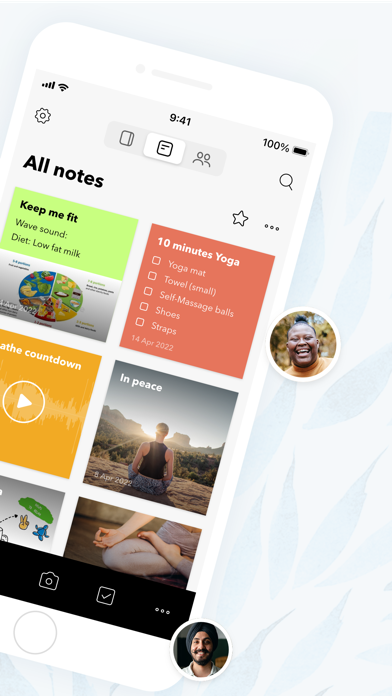
Notebook – Notes & To Do is a versatile productivity application designed to capture, organize, and manage all forms of information. Far beyond a simple note-taking tool, it allows users to weave together text, images, sketches, audio recordings, and checklists within a single note, providing a rich canvas for ideas. The app extends its capabilities by integrating diverse file types like PDFs and spreadsheets, and even offers dedicated note cards for photos and videos, making it a comprehensive digital workspace.
What truly sets Notebook apart is its intuitive design and seamless synchronization. Ideas captured on one device instantly reflect across all others and are securely backed up to the cloud. This ensures that your thoughts, projects, and to-dos are always accessible, whether you're brainstorming on the go or meticulously planning at your desk. From collecting web content to collaborating on visual 'noteboards' and even engaging in real-time digital 'spaces', Notebook provides a holistic environment for personal and professional productivity.
Key Features
- Rich Note Creation: Combine text, images, sketches, checklists, and audio within a single, dynamic note.
- File Integration: Attach dedicated note cards for PDFs, Word documents, spreadsheets, and other files.
- Comprehensive Checklists: Create and manage to-do lists with a dedicated checklist note card.
- Audio and Video Capture: Record ideas, meetings, lectures, or personal thoughts using audio and video note cards.
- Web Content Bookmarking: Collect and intelligently format articles, videos, and other online content for offline reading.
- Visual Noteboards: Organize and visualize tasks and projects in kanban-style boards, with collaboration features.
- Nested Collections: Structure and categorize notes and sub-notes in a hierarchical manner for superior organization.
- Collaborative Spaces: Brainstorm and work with others in real-time digital canvases, complete with audio and video calls.
Who It's For
Notebook – Notes & To Do is ideal for a wide range of users, from students and educators needing to capture lectures and organize research, to creative professionals sketching ideas, and business users managing projects and collaborating with teams. Freelancers, writers, and anyone who needs a robust system to track information, manage to-dos, and consolidate diverse content formats will find it invaluable. Its intuitive interface and comprehensive features make it suitable for both individual productivity and collaborative efforts, especially those who appreciate a visually appealing and seamlessly integrated digital workspace.