
Back to Apps
    Recipe Keeper icon

    Recipe Keeper

    Hidden Gem

    Organize, plan, and cook with ease using Recipe Keeper. Import, scan, and store recipes, create meal plans, and generate smart shopping lists. Your ultimat

    food
    4.8
    N/A
    iOS
    Android
    Free
    Honest Take

    + Users praise the app's efficiency in organizing recipes, creating meal plans, and generating grocery lists, highlighting its excellent import accuracy, even from handwritten notes.

    A recurring problem involves ingredients failing to categorize correctly or maintain their pairings within the app, causing inconvenience for users with large recipe collections.

    This page contains affiliate links. Learn more

    Screenshots

    Recipe Keeper screenshot 1
    Recipe Keeper screenshot 2
    Recipe Keeper screenshot 3
    Recipe Keeper screenshot 4
    Recipe Keeper screenshot 5

    Swipe to view more screenshots

    About Recipe Keeper

    Overview

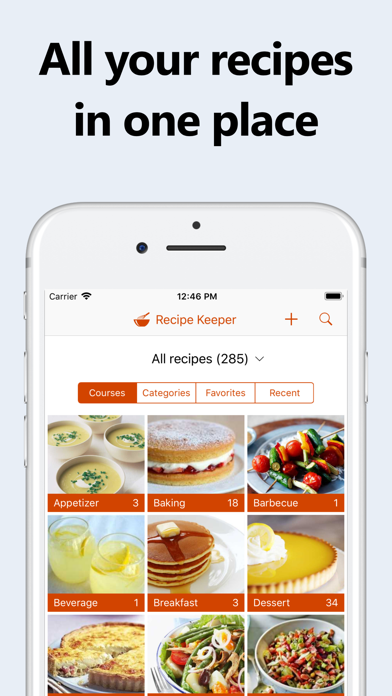
    Recipe Keeper is a robust and intuitive mobile application designed to be the ultimate culinary companion, organizing all your recipes, simplifying meal planning, and streamlining grocery shopping. At its core, the app acts as a comprehensive digital recipe box, allowing users to effortlessly store, categorize, and access their favorite recipes from a multitude of sources. Whether you're a seasoned chef with a cherished collection of family recipes, a budding cook exploring new culinary horizons, or simply looking to make healthy meal choices, Recipe Keeper provides the tools to manage your kitchen efficiently. It aims to eliminate kitchen chaos by centralizing recipe management and offering intelligent features for meal preparation.

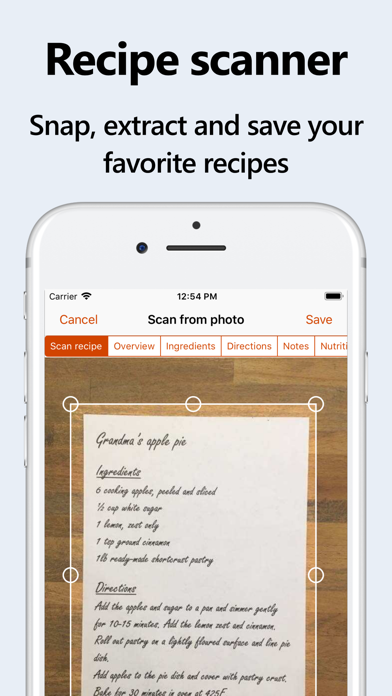
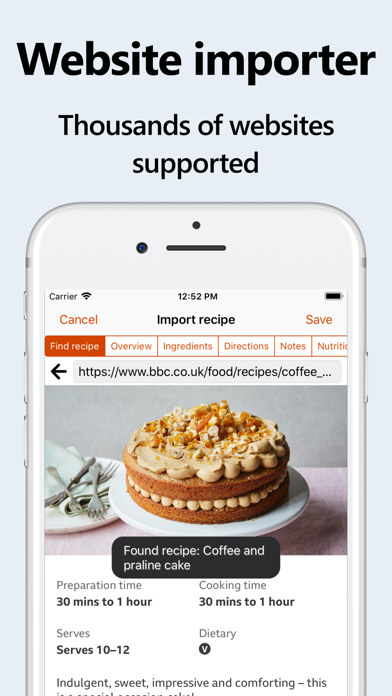
    Beyond basic recipe storage, Recipe Keeper excels in its ability to import recipes from various mediums. Users can quickly add recipes by typing them in, copying and pasting from existing documents, or directly importing from hundreds of popular recipe websites. A standout feature is its OCR technology, which allows for scanning recipes from physical cookbooks, magazines, or even handwritten notes, converting them into editable text. The app also empowers users with advanced organizational tools like customizable collections, courses, and categories, along with options to add nutritional information, rate recipes, and flag favorites. Its cross-device availability ensures your culinary library is always at your fingertips, whether you’re planning meals on your tablet or cooking in the kitchen with your phone.

    Key Features

    • Recipe Importing: Easily add recipes by typing, pasting, or importing from hundreds of popular recipe websites.
    • OCR Scanning: Digitize recipes from cookbooks, magazines, and handwritten notes using your device's camera.
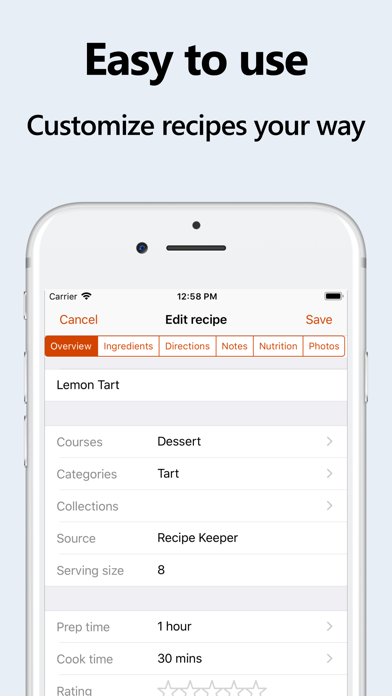
    • Customizable Organization: Categorize recipes with personalized collections, courses, and categories, plus add photos and ratings.
    • Nutritional Information & Search: Include nutrition facts and search recipes based on specific nutritional amounts.
    • Meal Planning & Shopping Lists: Plan meals weekly or monthly, generate random meal plans, and add ingredients directly to a smart shopping list.
    • Cooking Assistance: Check off ingredients as you cook and highlight the current step for an organized cooking experience.
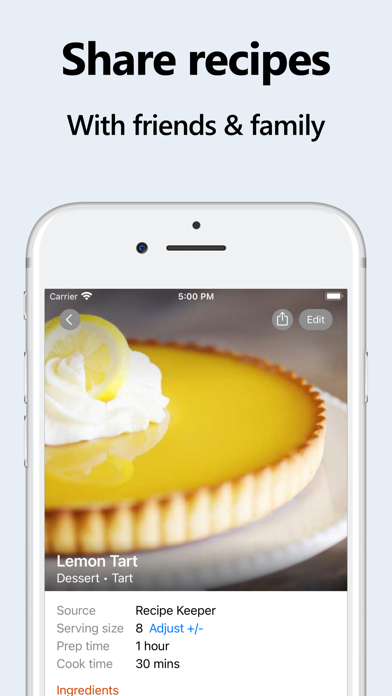
    • Recipe Sharing & Cookbooks: Share recipes via email or social media, create shared family collections, and generate printable PDF cookbooks.
    • Serving Size Adjustment: Automatically recalculate ingredient quantities when scaling recipe serving sizes up or down.

    Who It's For

    Recipe Keeper is ideal for anyone looking to bring order and efficiency to their kitchen. It's perfect for home cooks who have accumulated a vast collection of recipes scattered across different platforms, cookbooks, or handwritten notes and wish to consolidate them digitally. Families or individuals who struggle with meal planning and grocery list creation will find its integrated tools invaluable. Additionally, it caters to users interested in nutritional tracking, those who frequently import recipes from the web, and anyone who enjoys sharing their culinary creations with friends and family. From beginners to experienced chefs, Recipe Keeper streamlines the entire cooking process, making it enjoyable and stress-free.

    Key Features

    Choose from 25 different color schemes, light & dark modes
    Format recipes using bold and italics
    Customizable recipe collections, courses and categories
    Add nutrition information and search for recipes by nutritional amounts
    Check off ingredients while cooking, highlight the current direction

    Similar Apps

    Hidden Gem
    Recipe - Cooking,Meal Planner icon

    Recipe - Cooking,Meal Planner

    ## Overview Recipe - Cooking, Meal Planner is a comprehensive mobile application designed to transform the way users approach meal preparation. Boasting an impressive library of over 70 global recipes, ranging from Italian pasta dishes to intricate Japanese sushi, the app caters to a diverse array of culinary preferences and skill levels. Its core functionality revolves around simplifying the cooking process, offering more than just a collection of recipes; it provides an integrated system for meal planning and grocery shopping. The app's intuitive interface guides users through each recipe with clear, step-by-step instructions, ensuring even novice cooks can achieve delicious results. Beyond simply presenting ingredients and methods, it intelligently generates smart shopping lists based on selected recipes, streamlining the often-tedious task of grocery planning. This focus on user experience and practical utility makes Recipe an invaluable tool for anyone looking to organize their cooking, explore new cuisines, and minimize food waste. ## Key Features - **70+ Global Recipes**: Explore a diverse culinary landscape with dishes spanning various international cuisines. - **Step-by-Step Cooking Guides**: Follow clear, easy-to-understand instructions for every stage of the cooking process. - **Smart Shopping Lists**: Automatically generate grocery lists based on your chosen recipes, simplifying meal prep. - **Difficulty Filters**: Customize your recipe search by filtering options based on cooking skill level. - **Adjustable Servings**: Easily scale recipe ingredient quantities to match the number of people you're cooking for. - **Save Favorites**: Bookmark and organize your most loved recipes for quick access in the future. - **Multilingual Support**: Access the app and its features in multiple languages, making it globally accessible. ## Who It's For Recipe - Cooking, Meal Planner is ideal for individuals and families looking to streamline their meal preparation and grocery shopping. It caters to busy professionals seeking efficient ways to plan meals, culinary enthusiasts eager to explore new international dishes, and beginner cooks who benefit from clear, guided instructions. Anyone aiming to reduce food waste, organize their kitchen, and elevate their home cooking experience will find this app incredibly useful.

    Unverified
    Functional
    Undeveloped
    food
    5
    Free
    Hidden Gem
    Flavortown icon

    Flavortown

    THE #1 DINERS, DRIVE-INS AND DIVES RESTAURANT FINDER - WELCOME TO FLAVORTOWN! Find EVERY Diners, Drive-Ins and Dives restaurant from Guy Fieri's legendary Food Network show - all in one app! The ORIGINAL & FIRST Triple D / DDD / Flavortown finder app, trusted by food lovers and road trippers for over 15 years. Featured by fans across America as the must-have companion for exploring Guy's greatest food discoveries. --- YOUR ULTIMATE TRIPLE D ROAD TRIP COMPANION Whether you're planning an epic cross-country food adventure or craving local comfort food spots near you RIGHT NOW, discover over 1,500+ restaurants (with only a handful of closed ones) featured on Diners, Drive-Ins and Dives. From mouthwatering burgers and smoky BBQ to wood-fired pizza and authentic street tacos - find ALL the best local eats Guy Fieri has visited and made famous! --- KEY FEATURES INTERACTIVE MAP VIEW See all Triple D locations at a glance or search by city, state, or GPS location - plan your entire Flavortown route visually! FIND RESTAURANTS NEAR YOU Traveling? Instantly discover Diners, Drive-Ins and Dives spots nearby using GPS. Never miss a legendary Triple D restaurant again! ALWAYS UPDATED Rick watches for new restaurants as they appear on the Food Network show (app updates typically required) - you'll always have the freshest Flavortown intel. READ THOUSANDS OF FAN REVIEWS & COMMENTS See what fellow Triple D fans thought about their visits before you go. Real reviews from real Flavortown explorers! ONE-TAP DIRECTIONS Get turn-by-turn directions to any restaurant location from the restaurant details page - start driving to flavor in seconds. FULL RESTAURANT DETAILS Phone numbers, websites, hours, menus, social media links as they are available (Rick also watches for these changes too!) - everything you need in one place. SMART SEARCH Filter by name, address, city, state and more - find exactly what you're craving instantly. --- PERFECT FOR: - Guy Fieri fans and Food N

    Fervent
    Roadtrip-ready
    Fan-centric
    food
    5
    Freemium
    Hidden Gem
    21 Age ID Scan Verify icon

    21 Age ID Scan Verify

    Just open the app and scan the back of the ID. Unlimited scans Privacy safe as no data is stored. No internet needed. Can work in dark. Can beep when less than 21 years old.

    Utilitarian
    No-nonsense
    Efficient
    food
    5
    Freemium
    Hidden Gem
    Lunchbox Recipes icon

    Lunchbox Recipes

    Are you stuck making the same sandwiches for lunchboxes on repeat? Want to mix things up with easy, nutritious lunches that your child will actually eat and that don’t take hours to prep? Then this app is for you. This app is packed with 200+ family-friendly lunchbox recipes (and growing) to help you create exciting, balanced lunches without the stress. Whether you’re packing a school lunchbox, heading out for a picnic, or planning meals for a busy day, you’ll always have fresh ideas right at your fingertips. As my daughter got older and started preparing for school and as our family days out became more frequent I realised how important it was to have portable, fuss-free lunches that work for the whole family. Every recipe in this app is family-friendly and suitable from six months, so you can prepare once and feed everyone. Whether you’re looking for quick weekday lunches, picnic inspiration or lunchbox ideas that go beyond sandwiches, this app has you covered. Key features: • 200+ delicious, family-friendly lunch recipes • Clean, bright, easy-to-navigate design • Search by recipe name or ingredient • Save your favourites for quick access • Add ingredients straight to your shopping list • Filter recipes by dietary requirements (vegetarian, vegan, dairy-free, egg-free) • Free help and support via the app or my online support group • Regular free updates and new recipes added I hope you love the recipes as much as my family does. If you ever need help or have questions, please get in touch - I’m always happy to help. Natalie x

    Practical
    Nourishing
    Family-centric
    food
    5
    Freemium